| Standard Carrier Alpha Code® (SCAC™) |
Once a SCAC is assigned, it is valid for one year from the activation date unless otherwise specified.
 |
This article is intended for resellers. |
 |
Please take note of the following:
- These instructions are for renewing an existing SCAC that has not expired. Contact Customer Support for assistance with expired or cancelled codes.
- See Understanding the SCAC Lifecycle for more information about how SCACs are assigned and renewed.
|
To renew your SCAC:
- Click Reseller in the main menu, then click Manage Accounts. The Manage Accounts page opens.
- Click the View button associated with the account you’d like to view. The Account Profile page opens.
- Click the SCAC’s section header to expand and display its details.
- Click Renew SCAC. The One-Click SCAC Renew page opens.
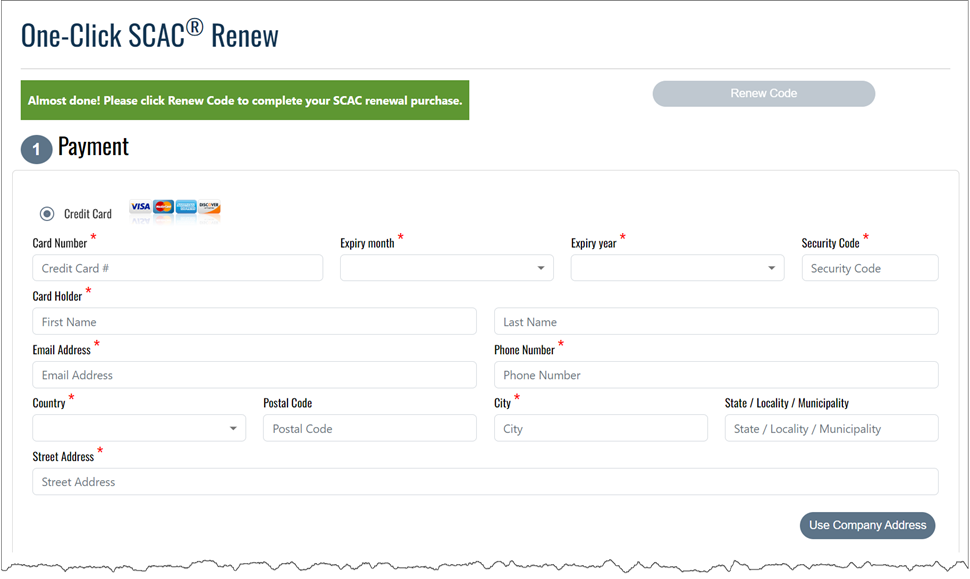
- Enter a payment method. Accepted forms of payment include:
-
Credit Card: Select this option to pay by credit card.
-
Bank ACH: Select this option to pay using a bank account.
|
Please note the following:
- The Bank ACH option is for use with US financial institutions only.
- Receive a 2.5% discount when you use Bank ACH.
|
- Click Place Order to complete the renewal. The Payment Processing page is displayed while the payment is processing.
|
Once renewed, an email confirmation along with the SCAC certificate is sent to the contact person on the account. |
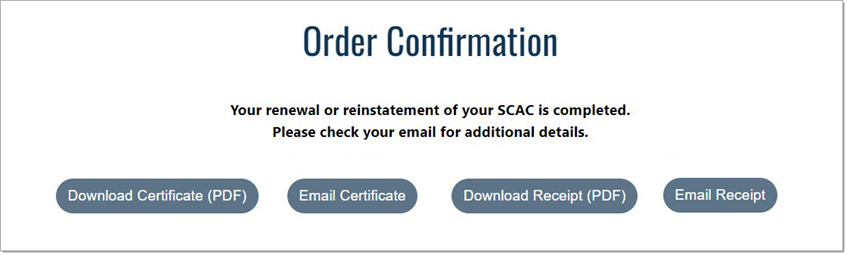
- The Order Confirmation page opens informing that the renewal was successful.
- To download the SCAC certificate, click Download Certificate (PDF).
- To download the receipt, click Download Receipt (PDF).
- To email the SCAC certificate, click Email Certificate, enter the email recipient(s), and then click Send Certificate to Recipients.
- To email the receipt, click Email Receipt, enter the email recipient(s), and then click Send Receipt to Recipients.